The Complete Guide to GoEnhance AI Video-to-Animation
- A Complete Guide to GoEnhance AI Video Animation Styles: Features, Examples, and Creative Use Cases
- Why video-to-animation matters in 2025
- Five model generations, one goal: better, faster, truer
- A quick tour of the style catalogue (50 +)
- Hands-on with the GoEnhance interface
- Feature deep-dive: what sets GoEnhance apart
- Creative use-cases (with real-world inspiration)
- Pro tips for flawless results
- Roadmap & future-proofing
- Final thoughts
A Complete Guide to GoEnhance AI Video Animation Styles: Features, Examples, and Creative Use Cases
Everything you need to know about its 50 + styles, lightning-fast pipeline, and real-world creative wins.
Why video-to-animation matters in 2025
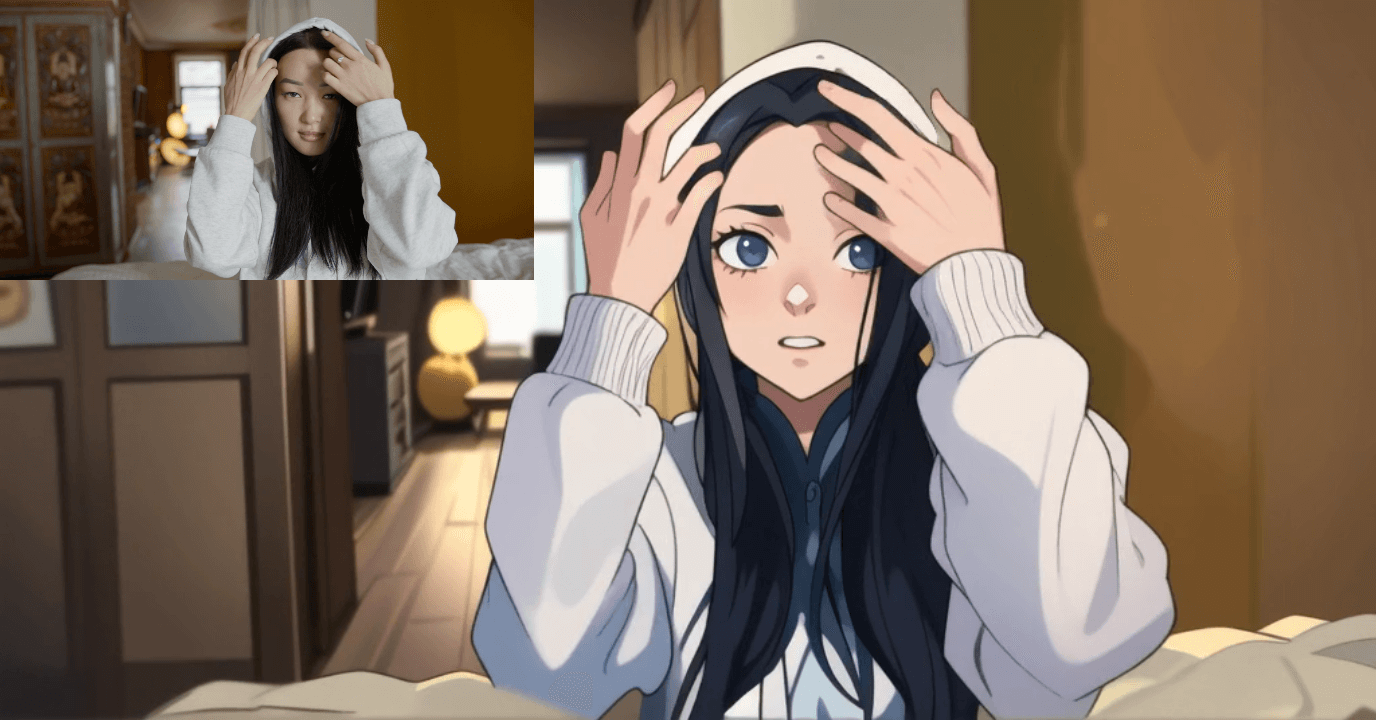
Turning live-action footage into stylised animation was once the realm of painstaking rotoscoping—artists tracing frames one-by-one—to achieve classics like Snow White. Deep-learning-driven style transfer has flipped the script: creators can now generate painterly, clay, or anime videos in minutes instead of weeks. The timing is perfect—short-form platforms such as TikTok are projected to reach 118 million monthly U.S. users this year, making animated content an easy way to stand out in a scroll-heavy feed.
Five model generations, one goal: better, faster, truer
| Version | Styles (count) | What it excels at | Typical 5 s render (Fast Mode) |
|---|---|---|---|
| v1 | 15 + | Highest faithfulness to source video | ~2 min |
| v2 | Transitional | Bridges v1 realism with v3 creativity | ~2 min |
| v3 | 10 + | Bold, experimental aesthetics | ~90 s |
| v4 | 30 styles | Best speed-to-quality ratio; hybrid realism + flair | ~60 s |
| v5 | 6 core styles | DIT architecture for long-form consistency | ~75 s |
DIT (Dual-Inference Transformer) is GoEnhance’s in-house engine that keeps style locked across thousands of frames. Competing style-transfer models often drift after 15–20 s, causing costume or palette shifts; GoEnhance can re-animate an entire 60-minute film and keep that red jacket red in the final act.
A quick tour of the style catalogue (50 +)
| Category | Signature Styles | Perfect for… |
|---|---|---|
| Modern Anime | Anime Style (v5), Light Anime, Chroma Anime, Cute Anime | Vlogs, game trailers |
| Studio-inspired | Pixar Style (v5 & v4), Ghibli Style | Family ads, pet videos |
| Classic Art | Monet Style, Van Gogh Style, Watercolor | Music videos, art education |
| Playful Miniatures | Clay Animation (v5), Clay Cartoon Style, Knit Style | Toy promos, stop-motion homages |
| Pixel & Retro | Pixel Art, Pixel Style (v5 & v3), 2.5D | Indie games, chiptune MVs |
| Graphic Novels | Bold Line Anime, American Comic, Pop Art | Action shorts, motion comics |
| Experimental | Origami Style, Mucha Style, AquaHue Anime | Fashion films, brand idents |
Clay Animation styles mimic the hand-moulded look of classic stop-motion (think Wallace & Gromit)—without requiring actual clay or a DSLR rig.
Hands-on with the GoEnhance interface
- Resolution – 720 p free, 1080 p for premium sparkle.
- Duration Slider – 1–10 s clips are sweet-spots for social snippets.
- Render Mode – Quality or Preview (fast draft).
- Restyle Subject Only – Keeps the background live-action while stylising just the performer—great for “toon-actor in real world” effects.
- Custom Background – Swap in a static matte-painting, 3-D render, or transparent PNG behind your animated hero.
- Seed Lock – Re-use a seed to guarantee matching shots across edits; change it for creative randomness.
- Private Mode – Off-cloud privacy; footage never leaves your encrypted workspace.
- Fast Mode – Asynchronous GPU queues slash render times by up to 40 %.
Feature deep-dive: what sets GoEnhance apart
| Feature | Why it matters | Industry context |
|---|---|---|
| Subject-Only Toggle | Hybrid scenes (live street + anime character) without rotoscoping masks | Manual rotoscoping is still a staple at major VFX houses—costing teams hours per shot. |
| DIT Long-Form Stability | Hour-long films stay on-model; no colour creep | Most GAN-based stylisers reset weights per batch, causing drift after ~600 frames. |
| Seeds & Determinism | Frame-exact redraws for revisions | Crucial when clients request “identical pass but tweak background only.” |
| Fast Mode GPU Scheduling | 5 s → 60 s renders on a single 4090 | Comparable open-source pipelines often take 2–3× longer on similar hardware. |
| Private Rendering | GDPR-ready, brand-safe environment | Essential for studios under NDA, or educators working with minors’ footage. |
Creative use-cases (with real-world inspiration)
- Education & Kids’ Content – Children engage longer with anime-styled explainers than plain talking-head videos.
- Short-Form Drama – East-Asian “short-drama” markets exceed 30 B video plays monthly; an animated variant is the next breakout genre.
- Catalog Remastering – Give 1990s live-action films a second life as stylised streaming exclusives.
- Music Videos – Rotoscoped-look videos—from A-ha’s Take On Me to modern K-Pop MVs—regularly surpass 100 M views.
- TikTok/Instagram Reels – Animated dance loops fit the platform’s 15–30 s sweet-spot and score higher rewatch rates.
- MMD & 3-D Previz – Stylise greyscale “white-model” renders to pitch look-dev before full shading.
- Game Cut-Scenes – Quickly prototype in-engine footage as pixel-art or comic-book reels for investor decks.
Pro tips for flawless results
- Keep motion readable – Styles with heavy outlines (Bold Line, Pop Line) love clear silhouettes; avoid shaky handheld footage.
- Lock your seed when splitting a long clip into chapters—this nails continuity.
- Export at 24 fps if you plan to interpolate to 60 fps later; it balances smoothness and render cost.
- Blend live backgrounds by enabling Restyle Subject Only and shooting against clean plates.
- Exploit Fast Mode for ideation, then re-render hero shots in Quality mode before publishing.
Roadmap & future-proofing
GoEnhance’s R&D team is porting the DIT engine to 4 K and 48 fps targets, with beta testers already clocking sub-5-minute renders for 1080 p / 30 s sequences on cloud H100s. Expect custom style packs (upload 10 reference frames to train a mini-LoRA in under an hour) and automatic lip-sync for dubbed audio later this year. These advances align with the broader research push towards content-aware video style transfer cited by Nature in its 2025 review
Final thoughts
Whether you’re a solo TikToker, an indie studio, or a classroom teacher, GoEnhance AI’s video-to-animation toolset flattens the barrier between imagination and moving picture. With 50 + styles, minute-level renders, and industry-first long-form stability, it delivers the creative control of classic rotoscoping—minus the hand cramps and deadline dread.
Ready to give your footage a second life? Fire up GoEnhance, pick a style, and watch your world draw itself into existence.
Written by Hannah, animation-tech enthusiast.